How Can We Help?
-
Controllers
-
- Pro-160 / 360 Fault Codes
- Pro-160 / 360 Temperature Sensors
- Pro-100 / 160 / 360 to Hall Throttle Wiring
- JSK-120 Driving Two Pro-360s
- RBT and Pro-160 / 360 P3 Pot Fault
- Pro-160 / 360 Dual Control
- Pro-100 / 160 / 360 Radio Control Failsafe
- Pro-100 / 160 / 360 to JSK-100 wiring
- Pro-100 / 160 / 360 Failsafe Contactor
- Double Heading the Pro-100 / 160 / 360
- Pro-160 Layout Diagrams
- Pro-100 / 160 / 360 Software Versions
- Use with shunt wound motors
- Use with Series Wound Motors
- Updating Firmware
- Double Heading Pro-160 / 360 & 4QD Series
- Push Button Mode With Limit Switches.
- Pro-100 / 160 / 360 Troubleshooting
- Speed Sensor Ratio
- Push Button - Forward / Off / Reverse Operation
- Show Remaining Articles (5) Collapse Articles
-
- Pro-160 / 360 Fault Codes
- Pro-160 / 360 Temperature Sensors
- Pro-360 Heatsink Removal and Replacement
- Pro-100 / 160 / 360 to Hall Throttle Wiring
- JSK-120 Driving Two Pro-360s
- RBT and Pro-160 / 360 P3 Pot Fault
- Pro-160 / 360 Dual Control
- Pro-100 / 160 / 360 Radio Control Failsafe
- Pro-100 / 160 / 360 to JSK-100 wiring
- Pro-100 / 160 / 360 Failsafe Contactor
- Double Heading the Pro-100 / 160 / 360
- Pro-100 / 160 / 360 Software Versions
- Updating Firmware
- Use with shunt wound motors
- Use with Series Wound Motors
- Double Heading Pro-160 / 360 & 4QD Series
- Push Button Mode With Limit Switches.
- Pro-100 / 160 / 360 Troubleshooting
- Pro-360 Locknut Service Bulletin
- Speed Sensor Ratio
- Push Button - Forward / Off / Reverse Operation
- Show Remaining Articles (6) Collapse Articles
-
- Pro-100 Fault Codes
- Pro-100 / 160 / 360 to Hall Throttle Wiring
- RBT and Pro-160 / 360 P3 Pot Fault
- Pro-160 / 360 Dual Control
- Pro-100 / 160 / 360 Radio Control Failsafe
- Pro-100 / 160 / 360 to JSK-100 wiring
- Pro-100 / 160 / 360 Failsafe Contactor
- Double Heading the Pro-100 / 160 / 360
- Pro-100 / 160 / 360 Software Versions
- Updating Firmware
- Use with shunt wound motors
- Use with Series Wound Motors
- Pro-100 / 160 / 360 Troubleshooting
- Speed Sensor Ratio
- Push Button - Forward / Off / Reverse Operation
-
- Mosfet Insulator Arrangement DNO & Porter
- How To Wire Up a Porter 5
- Closed Loop Current Control
- Fitting a Porter to a PDQ Power trike
- Driving the Porter by Raspberry Pi
- Porter: Disabling Regenerative Braking
- Porter Current Limit Adjustment
- DMR-203 Radio Control of a Porter 5 / 10
- Porter 40 Speed Controller
- Porter 40: Use with PWM Input
- Porter Troubleshooting
-
-
- PRO-150 Overview
- Double Heading for the Pro-150 and 4QD Series
- Pro-150 Hall Throttle Supply
- Pro-150 Hall Throttle Programming
- Pro-150 Push Button Use
- Use with shunt wound motors
- Pro-150 Fault Finding Guide
- Pro-150 Pt Fault Code
- Pro-150 programmable parameters
- Pro-150 Mechanical Information
- Pro-150 Basic Wiring Diagram
- Fraser Golf Buggies, Wiring for Pro-150
- DMR-203: Use with PRO-150 Controllers
- Pro-150 Capacitor Modification
- PRO-150 Current Limit
- PRO-150 Issue History
- PRO-150 Joystick Programming
- Show Remaining Articles (2) Collapse Articles
-
- 4QD-200/300 Overview
- Double Heading for the Pro-150 and 4QD Series
- Control Board Jumper Positions
- Ampflow motor
- Damage From Blown Mosfets
- DMR-203: Use with 4QD Series Controllers
- Battery Contactor for 4QD-200 / 300
- Adjustment for 48V
- Inhibit switch / footbrake - 4QD series only [tour 16]
- Forward / Off / Reverse Mode (4QD Series)
- Converting Parking Brake to Brake Light
- Disabling HPLO on Early 4QD Models
- Inhibit Ramp Modification [4QD series]
- Over voltage protection in the 4QD series
- Deadband values and removal
- How to dismantle the 4QD series
- Fault finding on the 4QD series
- Testing the 4QD Base Board and MOSFETs
- Reverse Acceptance Threshold [RAT] Modification
- Current limit resistors
- Use with Tacho Feedback Board
- Control Board Modification [Pre June 2010]
- Reverse Speed Modification [pre issue 17]
- Reversing Latch Modification [pre issue 16]
- Damage from a Reversed Battery (4QD Series)
- Mixing 4QD 150 / 200 / 300 series boards
- 4QD version history
- Inhibit
- Show Remaining Articles (13) Collapse Articles
-
- Damage from Reversed Batteries (NCC/VTX)
- Waveforms and Fault Finding
- Ramp Timings (NCC)
- Internal Power Supply and Protection Circuitry
- Fitting Expansion Connector
- NCC Speed Controller
- VTX and NCC Operating Voltages
- NCC Circuit Description
- VTX / NCC Fault Finding
- NCC Mark 2 Issue Number History
- NCC Mark 1 Issue Number History
- NCC Key Components
- NCC Zener Diode Failure
-
- Internal Power Supply and Protection Circuitry
- Current Limiting in the Pro-120 [and others]
- Pro-120 Mk1 History
- Pro-120 Mk2 History
- Pro-120 Key Components
- Earth Fuses: Why Do They Blow?
- Modifying the Pro-120 for other voltages
- Pro-120 Fault Finding Tips
- PRO-120: Multiple Slaves
- PRO-120 Ramp Reduction
- Fitting Expansion Connector
- Pro-120 Modification to give Uni-Directional Control
- Pro-120 Robot Wars Version
- Pro-120 Ignition Options
- Battery Discharge Protection: PRO-120
- Pro 120 Mark 1 Speed Controller
- PRO 120 Mark 1 - Additional Diagrams
- Show Remaining Articles (2) Collapse Articles
-
-
-
Accessories
-
-
- Articles coming soon
-
- Articles coming soon
-
- Articles coming soon
-
- Articles coming soon
-
- Articles coming soon
-
- Articles coming soon
-
Application Notes
-
- Alternative Double Heading [MU] Solution
- Double Ended Tram Control
- Loco Wiring: Auto Reversing Lights
- Speed to RPM Calculator
- Noise Suppression for Multiple Motors
- DCC / Airwire Interface
- Phoenix Loco Wiring
- Loco Wiring: Hand Control & Horn Relay Board
- Double Heading Problems
- Motors in Parallel
- Basic Model Loco Installation [with RBT and HRB]
- Low Pulling Power
- Radio Control
-
-
-
Technical
-
- Speed to RPM Calculator
- Noise Suppression for Multiple Motors
- Improving Heat Dissipation
- A Basic Installation
- Motor Noise Suppression
- Catching diodes
- Multi speed control
- Parking Brakes in Series
- Fuses and Circuit Breakers
- Radio Control Wiring Hints
- Typical Wiring for the PRO-150, DNO, VTX and NCC Controllers
- Wiring for Hand Control and Radio Control
- Wiring for Push Button Use
- Good Wiring Practise
- Motors in Parallel
- Push Button Mode With Limit Switches.
- Forward / off / reverse mode or push-button operation
- Basic Model Loco Installation [with RBT and HRB]
- Pro-100 / 160 / 360 to Hall Throttle Wiring
- How do I select the parts?
- Use With Switch Mode Power Supplies
- Push Button - Forward / Off / Reverse Operation
- Wiring for Curtis ET-126MCU
- Radio Control
- DIN Socket Wiring
- Show Remaining Articles (10) Collapse Articles
-
- Current limit
- PCB numbers
- Acceleration and Deceleration Ramps
- Thermal shutdown
- Ignition
- Power down state
- Ramps
- Reversing
- Overvoltage protection
- Battery Discharge Protection
- Joystick [aka wig-wag]
- Parking brake driver
- Pot Fault Detection
- High Pot Lockout HPLO
- Reverse polarity protection [tour 26]
- Main Capacitor
- Radio control interface
- Tacho Generator Feedback
- Voltage Following
- What Does a Motor Speed Controller Do?
- Ignition Circuit
- Coulomb Counting
- Show Remaining Articles (7) Collapse Articles
-
- Using a BMS with a Motor Controller
- Mosfet Alternatives
- Testing an Electric Motor
- What is EMC [Electromagnetic Compatibility]?
- Closed Loop Current Control
- Battery Current and Motor Current
- MOSFETs
- Half bridge
- Switching frequency
- What is Regenerative Braking?
- Batteries
- Customised Arc Potentiometers
- What is PWM Motor Control
- Full Bridge
- Towing
- Torque
- Surge Currents
- Speed Stability
- Quadrants
- Heat
- Thermal shutdown
- Heatsinking
- Choosing a Controller
- Earth Track Fuse and Earth Loops
- Tacho Set-Up
- Charging a 24V Battery From a 12V Source
- What Voltage Should I Use? [12, 24, 36, or 48V]
- Positional Servo Control [DNO / VTX]
- POT Dead Band
- Why Do Mosfets Fail?
- Back EMF & Internal Resistance
- Use of Generators with Speed Controllers
- Control by Microprocessor
- Foot Pedal Idea
- Coulomb Counting
- Low Pulling Power
- Curtis Equivalents
- Show Remaining Articles (22) Collapse Articles
-
Pro-360 Locknut Service Bulletin
We’ve recently had two Pro-360s returned for repair that showed signs of incorrect installation. The locknuts securing the main terminal posts to the PCB had been loosened and this resulted in short circuits destroying both the mosfets and the control board.
This picture shows the issues…
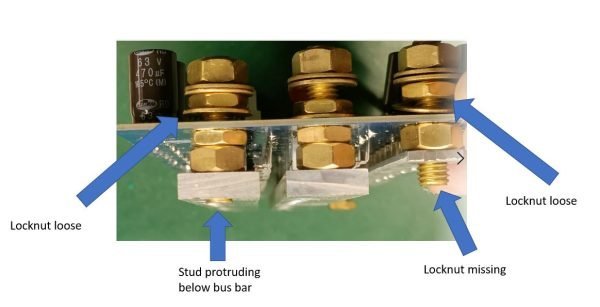
Points to note are:
1] Never loosen the locknuts, these are set during production and do not need to be undone.
2] If a locknut does come undone, and if the terminal stud rotates in the bus bar, the stud may cut through the pink insulation strip between the bus bar and the heatsink creating a short circuit.
3] If you find that a locknut has become loose, it is ok to re-tighten it [to 6Nm], BUT you MUST use a multi-meter to check to see if any connection has been created between the terminal posts and the heatsink. If this has occurred, loosen the locknuts and wind the stud out of the bus bar until the connection disappears. Then re-tighten the locknut and re-check for connectivity.
4] If you use a Pro-360, we recommend disconnecting the power, removing the cover and inspecting all the locknuts for security.